Migration Guide to v1.3.0
This guide shows the practical implementation differences from SDK v1.2.0 to SDK v1.3.0.
iOS Changes
Status view now supports defaultVenueId
Please set this defaultVenueId to 1
Before:
CrowdGlowStatusView(
  statusTextColour: .white,
  statusTextFontName: "Helvetica",
  statusTextFontSize: 18,
  statusTextAlignment: .center,
  actionButtonColour: .systemGreen,
  actionButtonTitleColour: .white,
  actionButtonTitleFontName: "Helvetica-Bold",
  actionButtonTitleFontSize: 18,
  actionButtonHeight: 50
)
After (v1.3.0):
CrowdGlowStatusView(
  statusTextColour: .white,
  statusTextFontName: "Helvetica",
  statusTextFontSize: 18,
  statusTextAlignment: .center,
  actionButtonColour: .systemBlue,
  actionButtonTitleColour: .white,
  actionButtonTitleFontName: "Helvetica-Bold",
  actionButtonTitleFontSize: 18,
  actionButtonHeight: 60,
  defaultVenueId: 1
)
Gobos & Palettes have moved location in the bundle
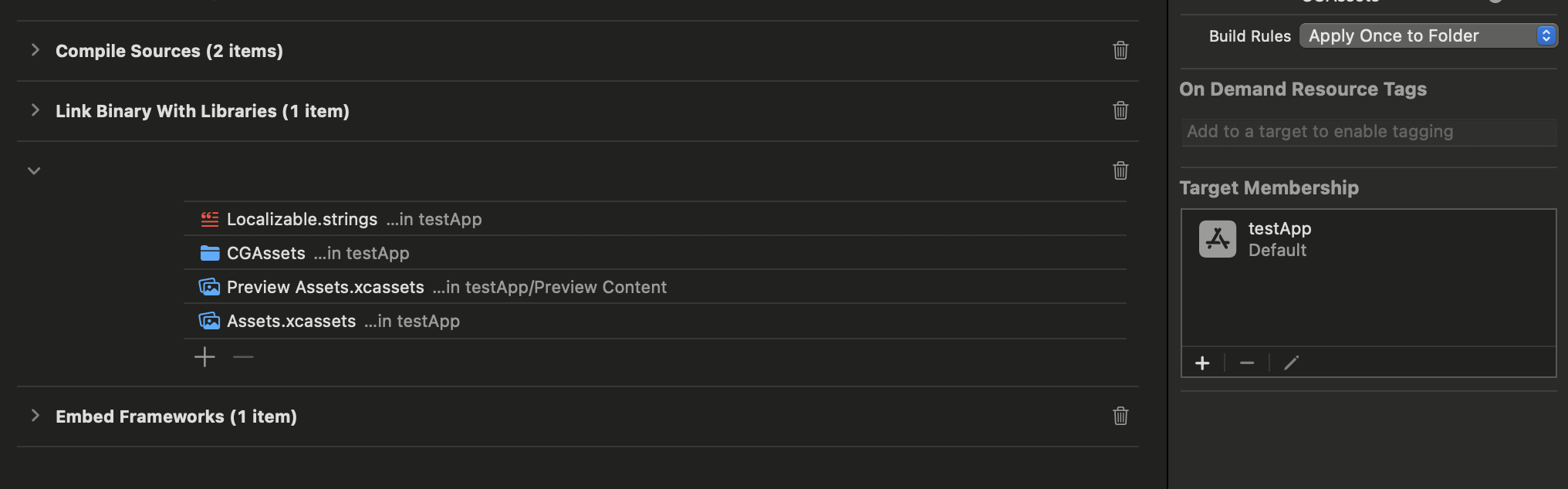
Originally the Gobos folder and Palettes.json were located in the root app of the app. You should now delete these, and copy the new CGAssets folder from the SDK into the root of the app.
CGAssets now contains Gobos, Palettes and Maps in a single folder. This folder should have the build rules set to Apply Once To Folder and your app should be added as a target membership.
Pixel Mapping Support
Support for pixel mapping has been added to the SDK. The only thing you need to do is copy the Maps folder into CGAssets. The team at CrowdGlow will supply you with this Maps folder directly after the events content creation is completed and we have processed the mapped files.
As an example, it will contain the following files:
Maps/Venue-1/map.json
Maps/Venue-1/1/video.mp4
Maps/Venue-1/2/video.mp4
Maps/Venue-1/3/video.mp4
Maps/Venue-1/standing-overlay.png   (optional)
Android Changes
Status view now supports defaultVenueId
Please set this defaultVenueId to 1
Before:
new CrowdGlowStatusView(
  context,
  "#FFFFFF",
  "",
  18f,
  Gravity.CENTER,
  "#1DB954",
  "#FFFFFF",
  "",
  18f,
  50
);
After (v1.3.0):
new CrowdGlowStatusView(
  context,
  "#ffffff",
  "sans-serif",
  16f,
  Gravity.CENTER,
  "#007AFF",
  "#FFFFFF",
  "sans-serif",
  16f,
  60,
  1
);
Gobos & Palettes have moved location in the bundle
Originally the Gobos folder was located in the res/drawables folder and Palettes.json was located in the root app of the app. You should now delete these, and copy the new CGAssets folder from the SDK into
assets/CGAssets
CGAssets now contains Gobos, Palettes and Maps in a single folder.
Pixel Mapping Support
Support for pixel mapping has been added to the SDK. The only thing you need to do is copy the Maps folder into CGAssets. The team at CrowdGlow will supply you with this Maps folder directly after the events content creation is completed and we have processed the mapped files.
As an example, it will contain the following files:
Maps/Venue-1/map.json
Maps/Venue-1/1/video.mp4
Maps/Venue-1/2/video.mp4
Maps/Venue-1/3/video.mp4
Maps/Venue-1/standing-overlay.png   (optional)